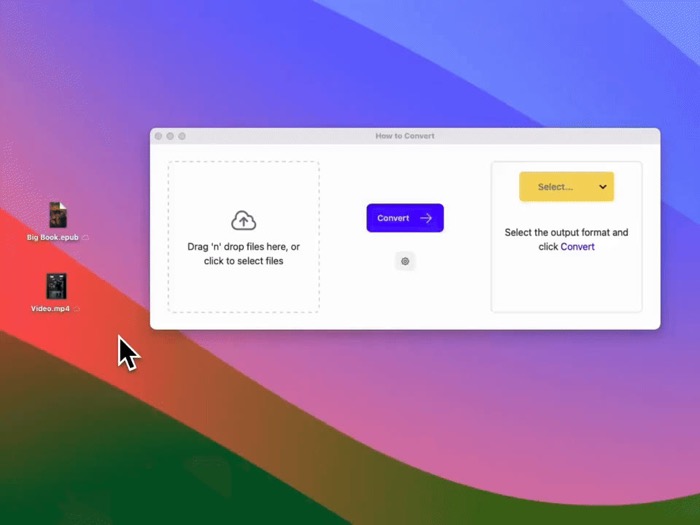
It’s a universal file converter that performs conversions locally on your device.
It does over 3000 document, video, image and audio conversions.
How? By letting you run multiple command-line file conversion tools from a simple drag and drop app (imagemagick, libreoffice, ffmpeg and pandoc).
You don't have to touch the command-line to use them.
There are plenty of file conversion sites, but when you use them, you’re sending your files and data to their servers.
I didn’t like that. The alternatives are command-line tools that run locally.
I wanted to use these tools but with a drag-and-drop app so non-programmers could use it.
I made howtoconvert.co
It’s a universal file converter that performs conversions locally on your device.
It does over 3000 document, video, image and audio conversions.
How? By letting you run multiple command-line file conversion tools from a simple drag and drop app (imagemagick, libreoffice, ffmpeg and pandoc).
You don't have to touch the command-line to use them.
There are plenty of file conversion sites, but when you use them, you’re sending your files and data to their servers.
I didn’t like that. The alternatives are command-line tools that run locally.
I wanted to use these tools but with a drag-and-drop app so non-programmers could use it.
I made howtoconvert.co
It’s a universal file converter that performs conversions locally on your device.
It does over 3000 document, video, image and audio conversions.
How? By letting you run multiple command-line file conversion tools from a simple drag and drop app (imagemagick, libreoffice, ffmpeg and pandoc).
You don't have to touch the command-line to use them.
There are plenty of file conversion sites, but when you use them, you’re sending your files and data to their servers.
I didn’t like that. The alternatives are command-line tools that run locally.
I wanted to use these tools but with a drag-and-drop app so non-programmers could use it.
I made howtoconvert.co
There are plenty of file conversion sites, but when you use them, you’re sending your files and data to their servers.
I didn’t like that. The alternatives are command-line tools that run locally.
I wanted to use these tools but with a drag-and-drop app so non-programmers could use it.
How to Convert does over 3000 document, video, image and audio conversions.
I made
http://howtoconvert.co
It’s a universal file converter that performs conversions locally on your device.
It does over 3000 document, video, image and audio conversions.
How? By letting you run multiple command-line file conversion tools from a simple drag and drop app (imagemagick, libreoffice, ffmpeg and pandoc).
You don't have to touch the command-line to use them.
There are plenty of file conversion sites, but when you use them, you’re sending your files and data to their servers.
I didn’t like that. The alternatives are command-line tools that run locally.
I wanted to use these tools but with a drag-and-drop app so non-programmers could use it.
I originally posted this here
https://threads.com/@jakemangerdev
/post/DIBUc-wJbGi
…
and received an amazing response, got about 30 feature requests and I've been adding features since. This update adds almost 1000 conversions.
I made
http://howtoconvert.co
There are plenty of file conversion sites, but when you use them, you’re sending your files and data to their servers.
I didn’t like that. The alternatives are command-line tools that run locally.
I wanted to use these tools but with a drag-and-drop app so non-programmers could use it.
How to Convert does over 3000 document, video, image and audio conversions.